The tech that got you to $300K won't get you to $1M.
You're not disorganized. You've got ClickUp, Dubsado, Notion, Stripe, a shared Drive, Zapier, and your inbox. The problem is you and your team spend more time maintaining all of it than actually doing the work that grows your business. Every manual handoff, every tool switch, every "let me check" — that's hours your team loses every week to a tech stack that can't keep up with where you're going.
I consolidate it into one system built around how your business actually runs. Your team gets back 10+ hours a week. You get back to scaling your business.
● 30-day guarantee · your team runs on it seamlessly, or I keep working till they do
You have more than enough time in the work week to run your business. If you can't find it, you're doing too much manually.
Add it up. The 45-minute client setups. The 10-minute status emails. The Zap babysitting. The tool subscriptions. The VA you hired to bridge the gaps. The ops coordinator you're considering hiring. The deals that stalled because your pipeline lived in a spreadsheet you updated on Fridays.
That's two months of full-time work — spent managing tools instead of serving clients or closing deals. 10+ hours a week your team loses to maintenance instead of growth.
One system that replaces the five your team spends all week maintaining.
This is a business system, not a collection of tools. Here's what changes when your team runs on one:
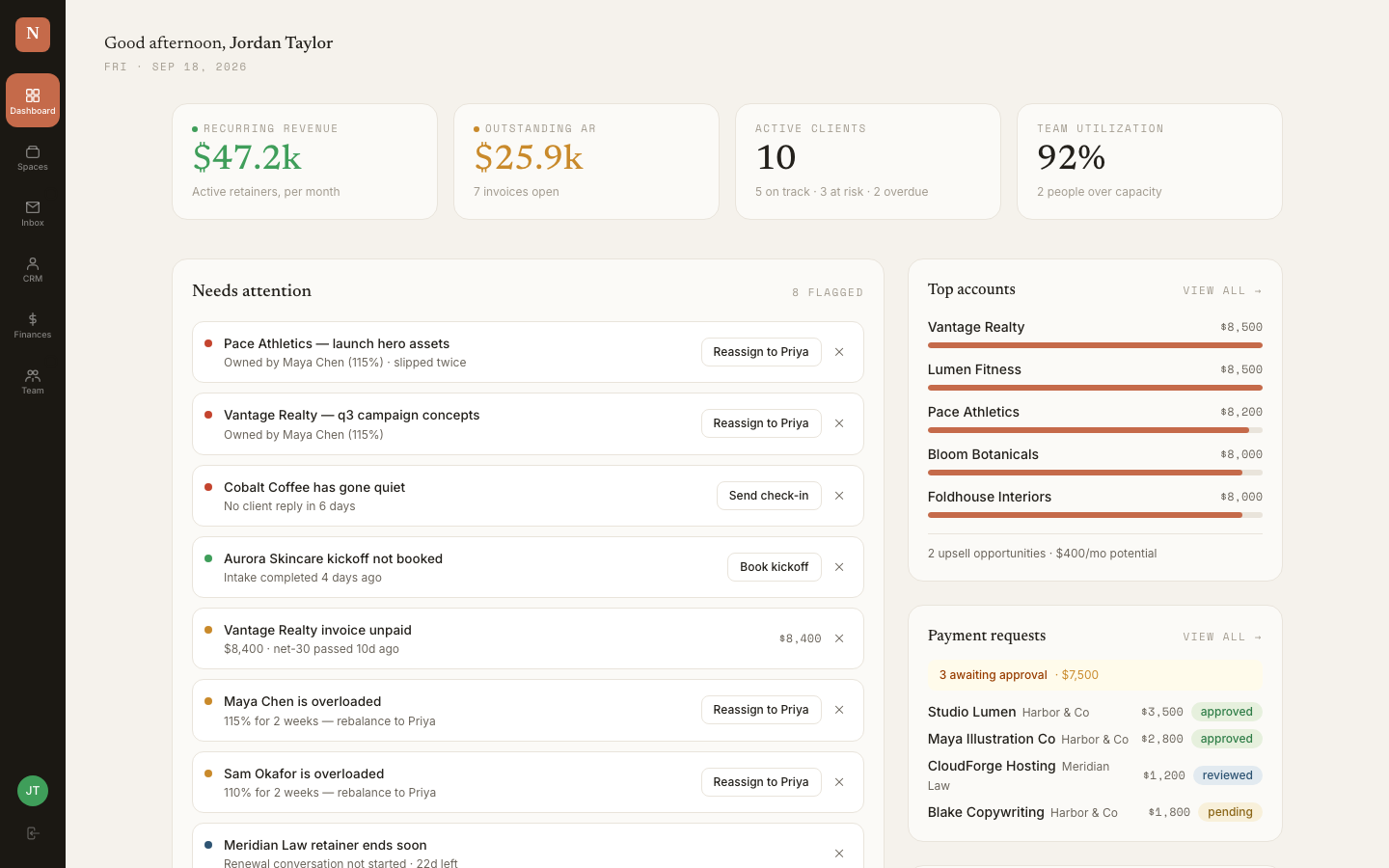
Command Center
Problem it replaces: Switching between five tabs to see what needs attention
One screen. Pipeline, inbox, tasks, finances, team capacity. Your team knows when something's about to break before you have to tell them. You stop spending mornings figuring out where you are and start spending them on growing the business instead of maintaining it.
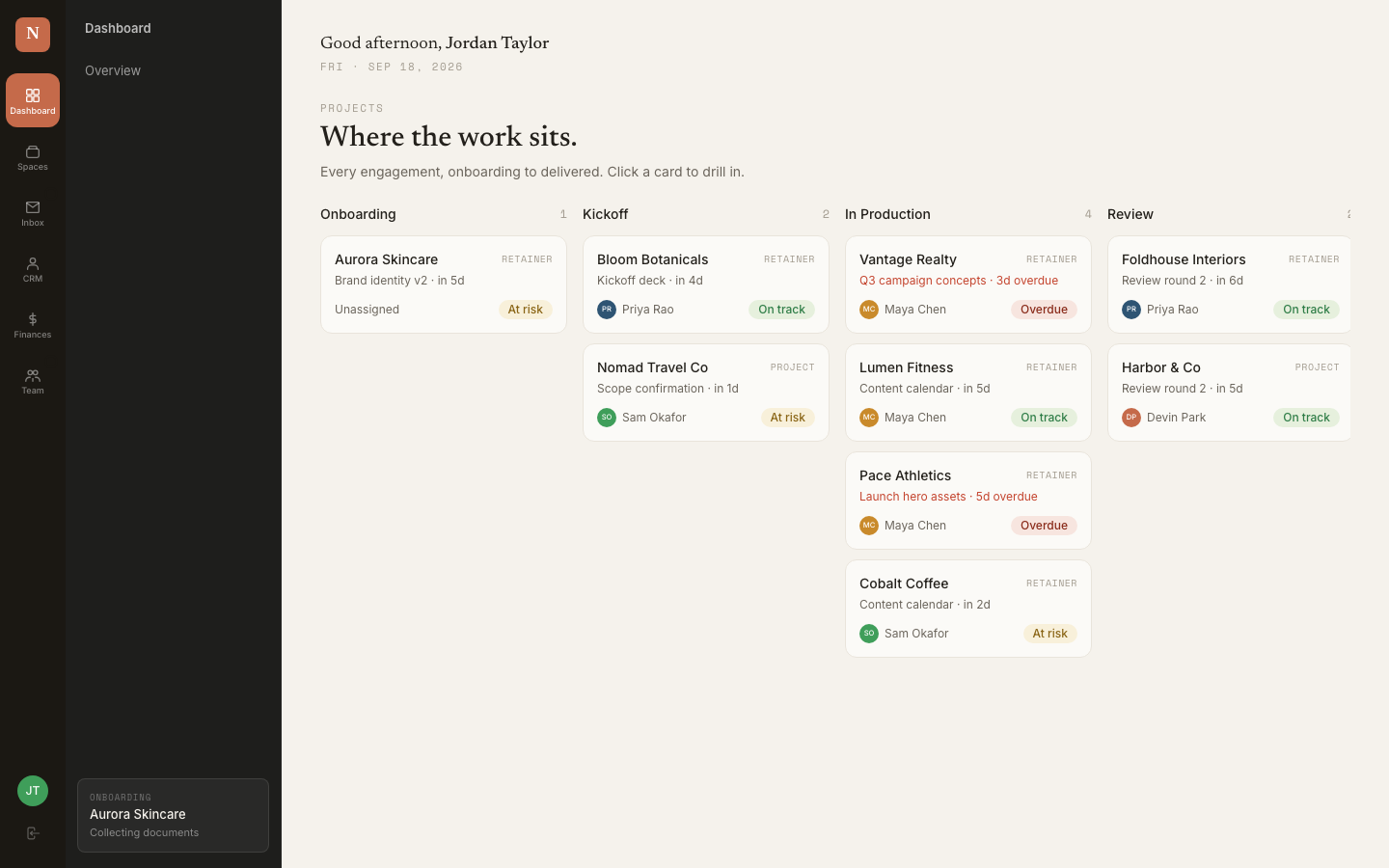
Clients and Pipeline
Problem it replaces: Lost context, duplicate entries, nobody knows who last touched what
Every client has one record with their full picture — messages, deliverables, invoices, files, activity timeline, notes. Your team opens it once and sees everything. No more "wait, where did they say that?" You finally stop being the only person who can tell when something's about to break.
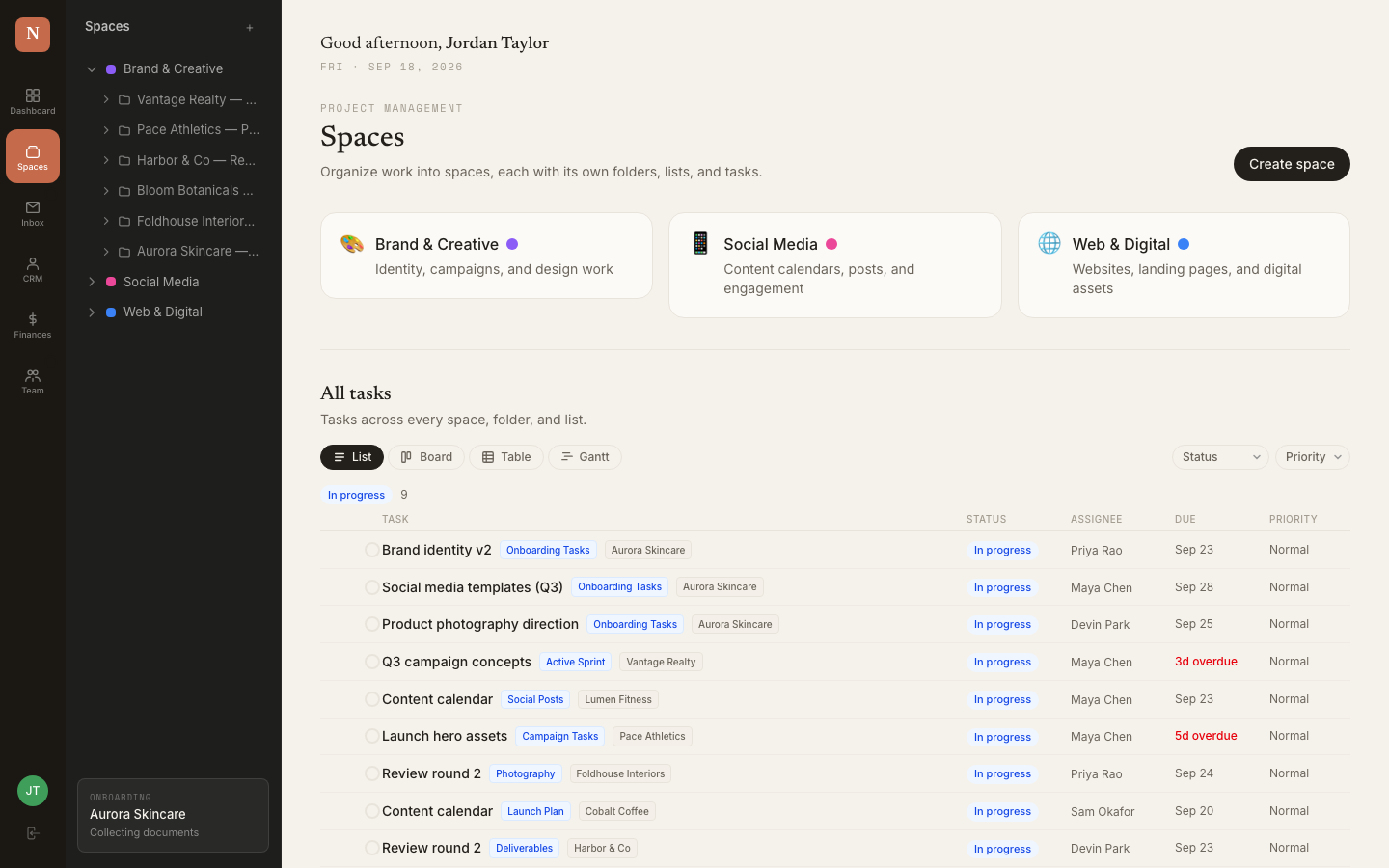
Projects and Deliverables
Problem it replaces: Tracking tasks in Asana, status in Slack, files in Drive, invoices in QuickBooks — none of it connected
Every project lives under the right client. Deliverables have status, due dates, assignees, dependencies, and approvals — all in one place. Your team sees what's theirs without digging. Progress updates don't require a meeting.
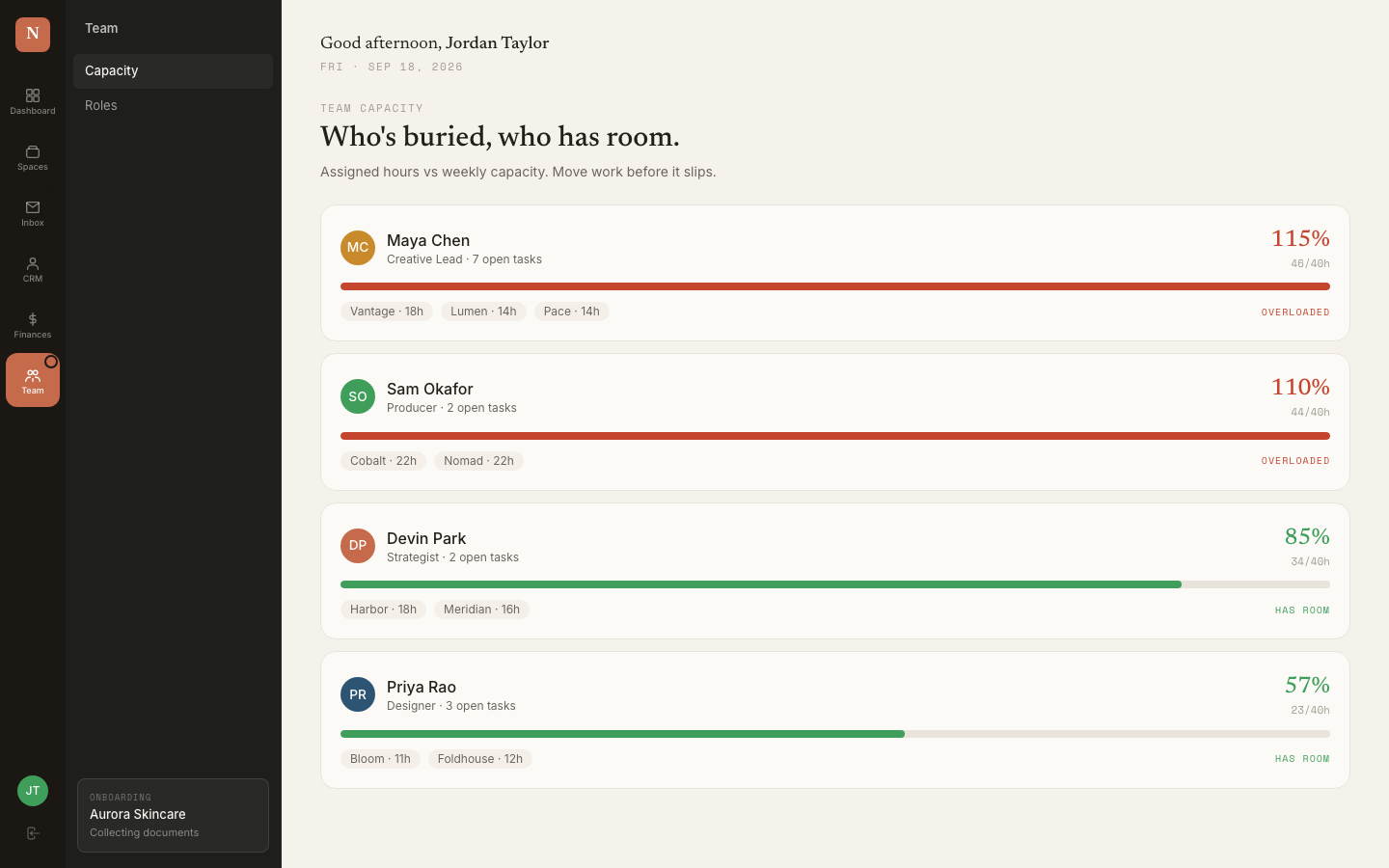
Team Capacity and Workload
Problem it replaces: You guessing who has bandwidth, your team getting overloaded while you're unaware
Every task and deliverable is assigned, tracked, and visible. You see what everyone's working on, what's overdue, and who has capacity — without asking. Your team stops spending weekends catching up because the work was distributed unevenly all week.
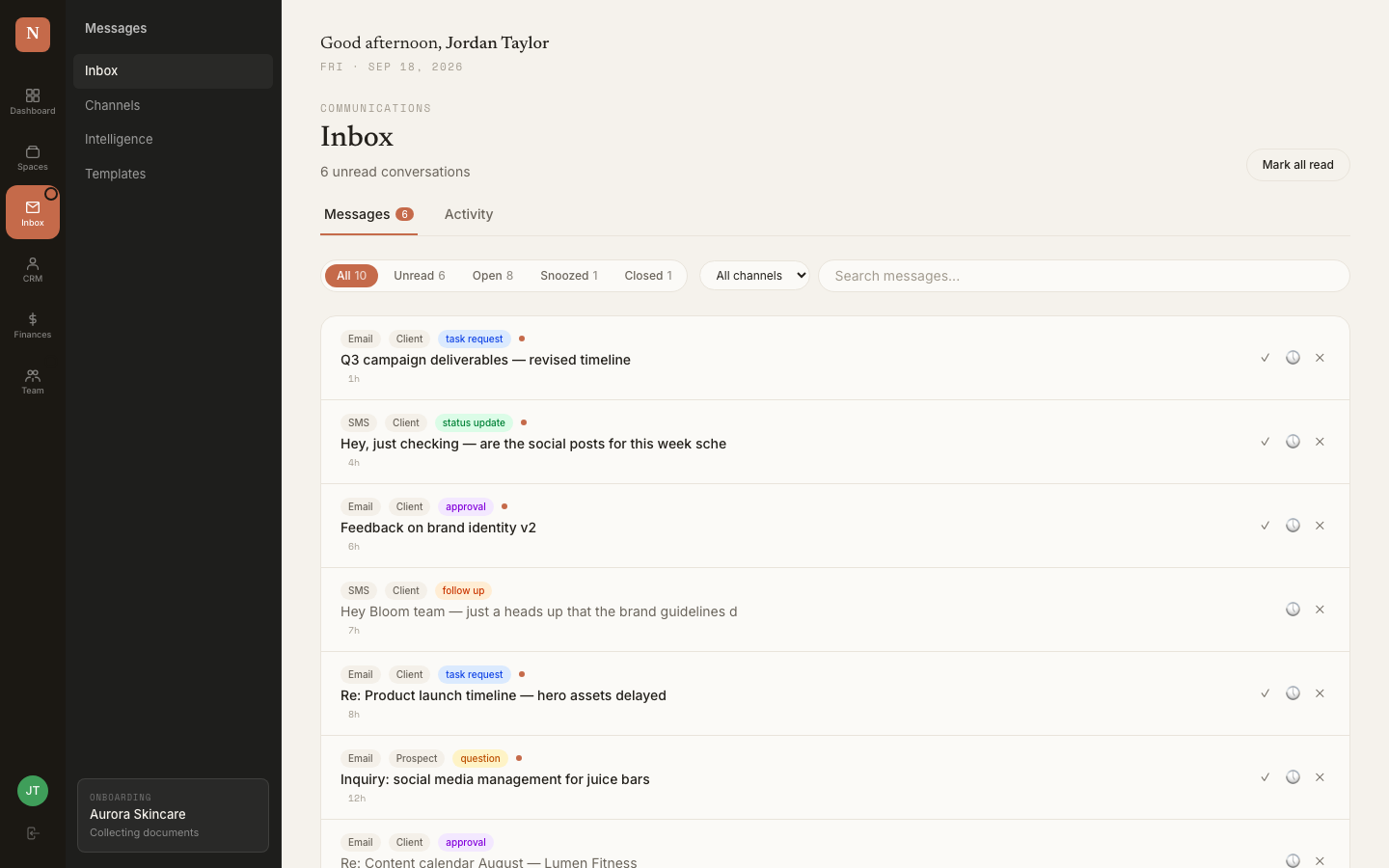
Inbox and Message Routing
Problem it replaces: Gmail, Slack, texts — messages scattered, context missing, someone always has to ask "who's handling this?"
Messages land in one inbox, auto-linked to the right client or prospect. Routing rules assign them to the right team member. Reply threads stay attached to the record. No more "forward me that email so I can see what they said."
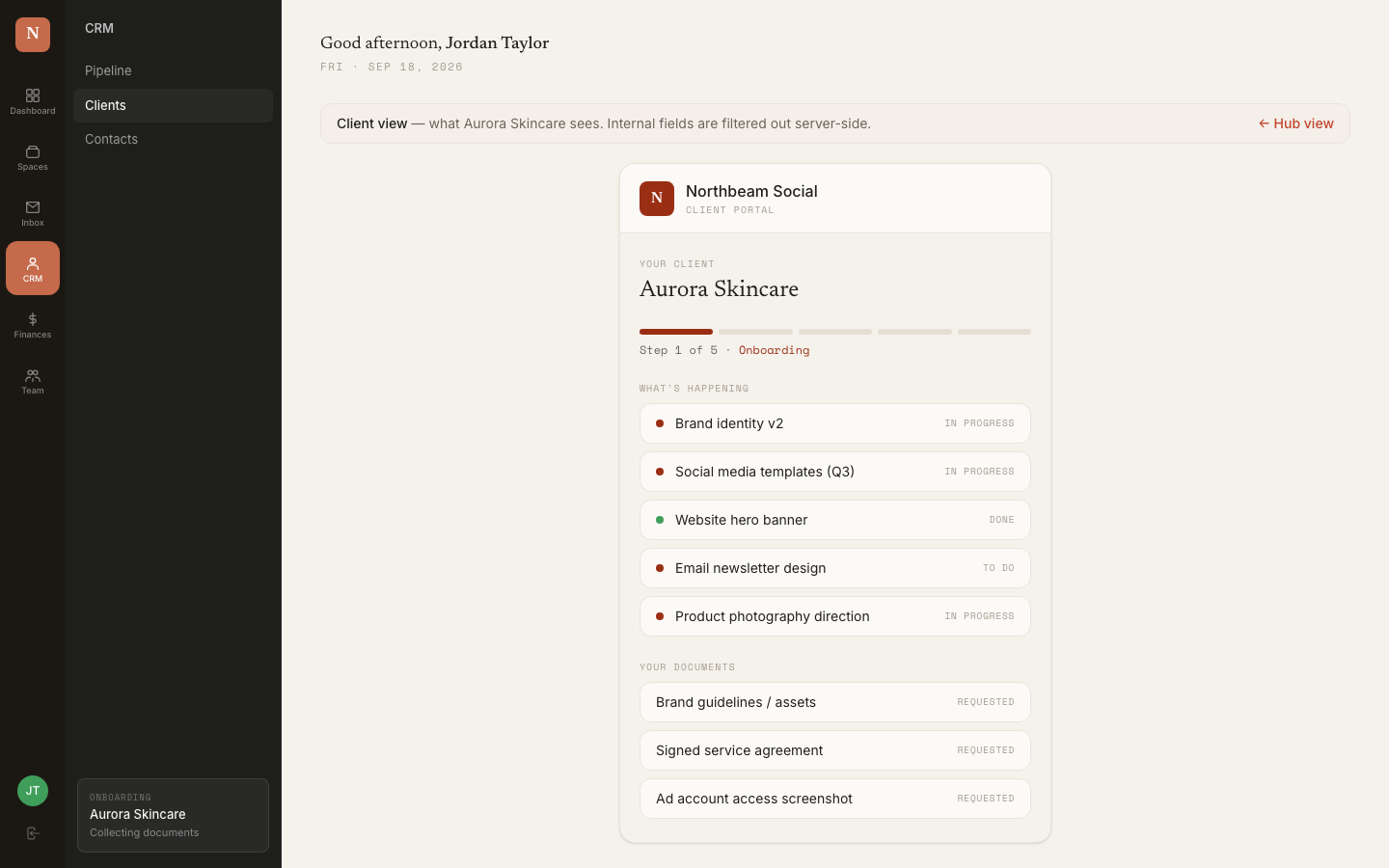
Client Portal
Problem it replaces: Clients emailing for updates, approvals happening over text, onboarding forms lost in replies
Each client gets a portal. Onboarding forms, document uploads, deliverable status, approvals, invoices, activity timeline — all there. They check status themselves instead of emailing your team. You finally feel like you're running a company, not babysitting tech.
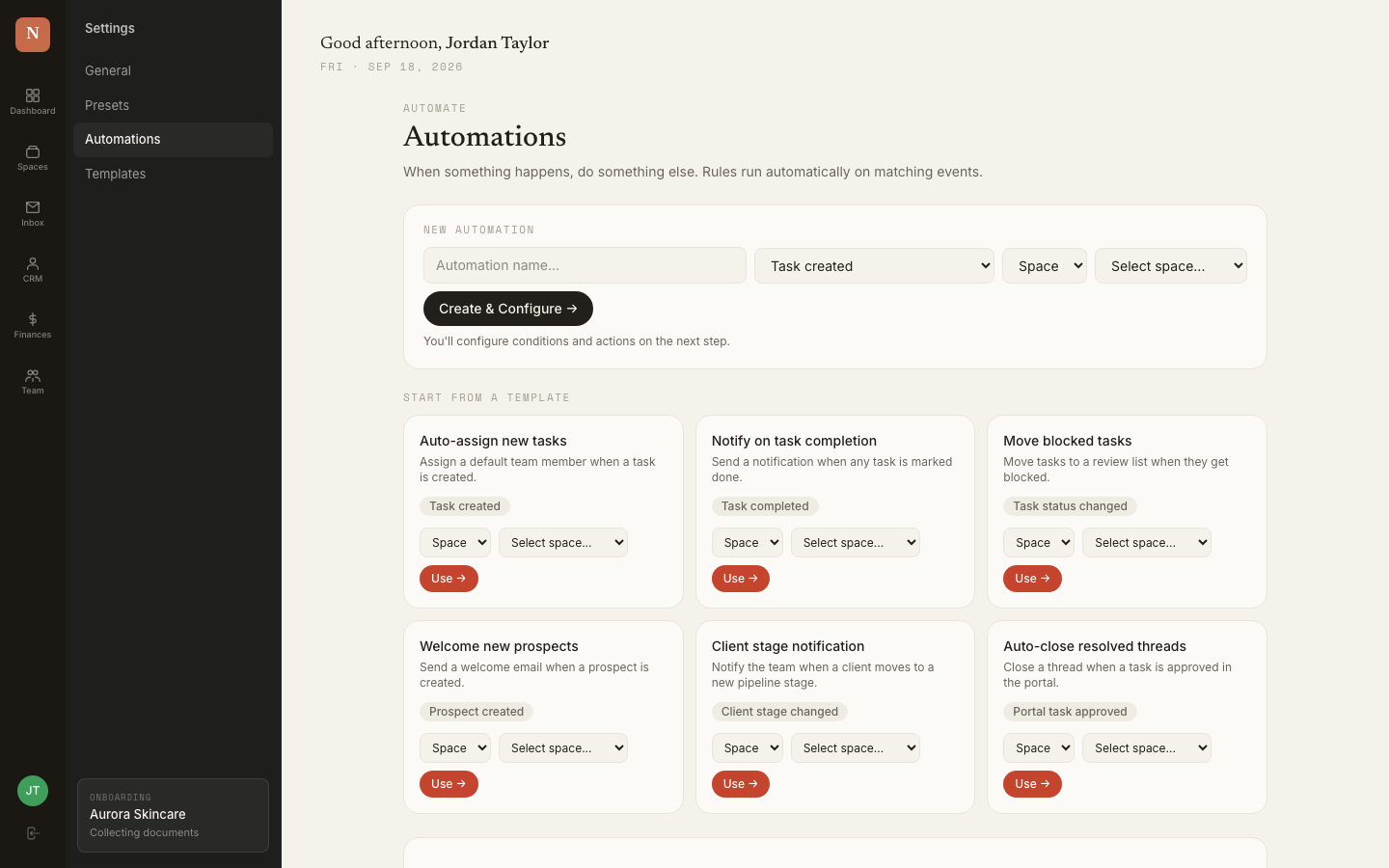
Automations That Actually Run
Problem it replaces: Zapier breaking, manual follow-ups, status updates you have to type yourself
Form submission creates a task. Message arrives, routes it. Status changes, fires a notification. Overdue deliverable, escalates it. No third-party tool to maintain. Full execution history so you see what ran and when.
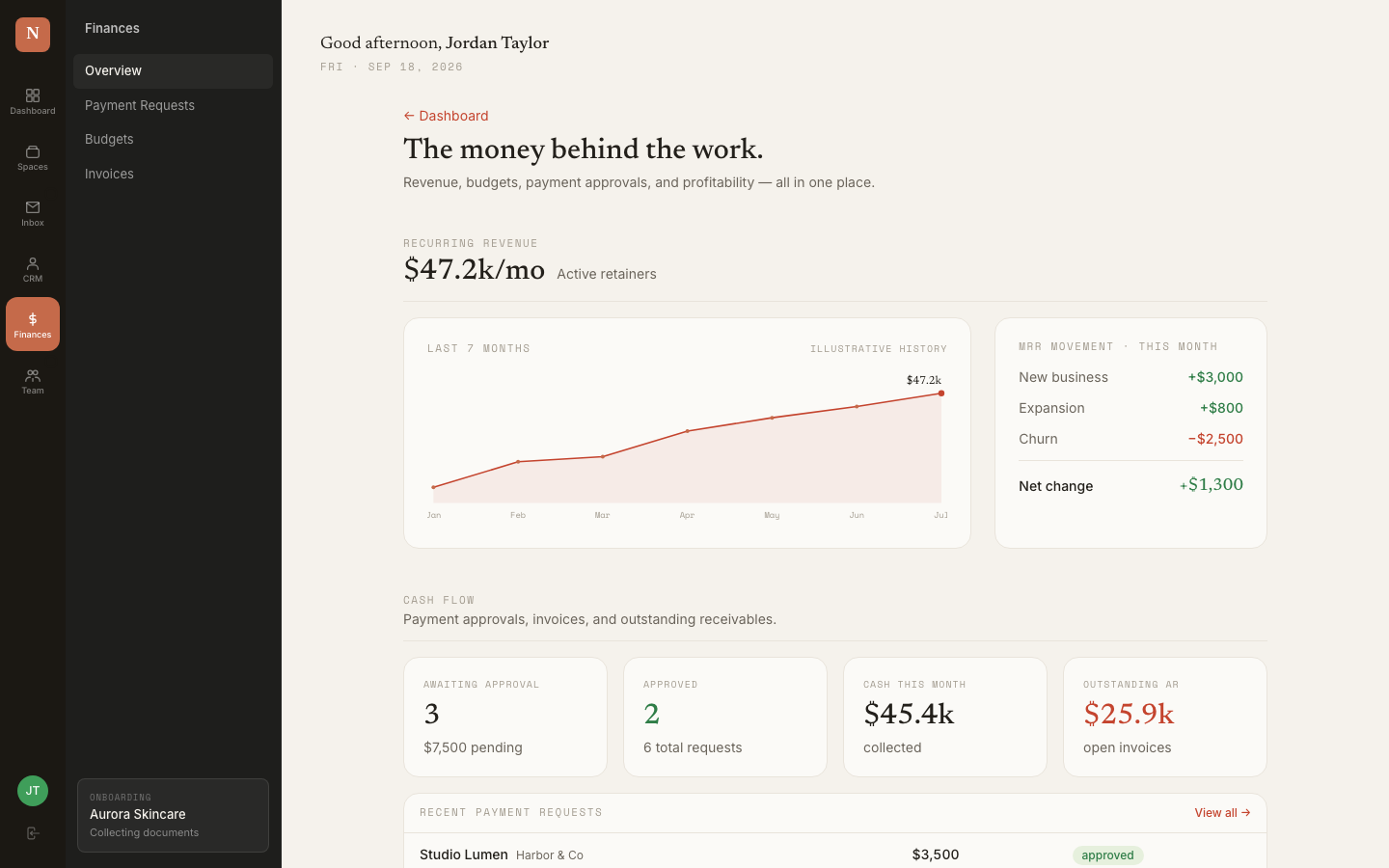
Financial Dashboard
Problem it replaces: Switching between QuickBooks, your bank, and a spreadsheet to figure out where you stand
One screen. MRR, cash collected, outstanding invoices, pipeline value, what needs attention right now. You stop spending mornings figuring out where you are and start spending them on what moves the business forward.
Not a screenshot. The real thing.
This is the actual system running on demo data — the same architecture I build around your business. Open it and click around: check a client's full picture without switching tabs, reassign a deliverable without a message thread, see your pipeline and finances in the same place, watch a form submission auto-create a task. This isn't a mockup. It works.
Three steps. Six weeks. Your team gets 10+ hours back every week.
Audit your current stack
We pull apart what you're running today — every tool, every handoff, every process that exists only in someone's head. Your pipeline stages, client types, onboarding steps, team structure, reporting cadence, and the manual work nobody's measured but everyone feels.
This isn't starting from scratch. You've built something real. We're finding the hours your team is losing and wiring everything together.
I build it and move you in
I build one system around your map — your pipeline stages, your intake fields, your automation rules, your client portal, your team permissions — and migrate your existing clients and data in. Day one isn't a blank slate. It's your business, already loaded.
Your team starts in a system that already has their clients, tasks, and projects in it — not an empty tool they have to populate.
Train your team, then it's yours
I train your team on the live system with their real data until they're running independently. Then I hand it over. You own it — not a subscription you rent.
Your team stops spending hours on maintenance and starts spending them on the work that actually grows your business.
Six weeks from discovery call to your team running on it — and 10+ hours a week back across your team from day one.
You've thought about these. Maybe tried them.
Hire an ops coordinator
A coordinator runs $50-80K. An operations manager runs $70-120K. Either way, they spend months ramping, and when they're up to speed the knowledge lives in their head — you've traded one single point of failure for another with a salary. When they leave, it leaves with them. And honestly? In 2026, most of what they'd spend their time on — routing messages, assigning tasks, chasing follow-ups, updating statuses — a system should be doing. You don't need another person managing your tools. You need tools that don't need managing.
Use the "all-in-one" tool
You've probably already tried one. ClickUp, Monday, Dubsado, HoneyBook — they all promise to consolidate. But they're built for the average business at a smaller stage. You spend weeks fitting your process into their structure, your team half-adopts it, and six months later you're using it for one thing while everything else is back in the old tools. The problem was never "we need a tool." It was "the tool needs to fit our business at this stage."
Hire a developer or freelancer
You get a build and a handoff. No data migration, no team training, no adoption plan. The system sits there while everyone keeps using what they know. And the first time something needs to change, you're waiting on someone who's already on the next project.
I don't hand you a tool and disappear. I replace the stack with one system — your pipeline, your inbox, your client portal, your automations, your finances, all connected — and I stay until your team is running on it. Then it's yours. No monthly seat fees. No platform dependency.
This isn't for everyone.
If it's not a fit, I'll tell you on the call — I'd rather lose the sale than build you something you won't use.
This is for you if
- You're doing $300K+ with a team and active clients
- Your tech stack works, but it takes too many hours to maintain — and those hours are coming out of growth
- You've tried consolidating before and your team drifted back to the old tools
- You want one system built around your business that you own — not another subscription
- You want your team focused on client work and growth, not tool maintenance and manual handoffs
This isn't for you if
- You're solo with no team — this is built for businesses that need to delegate, not solo operators
- You're under $300K and haven't hit the point where your tools are slowing you down yet
- You want a template or an off-the-shelf tool — this is custom
- You're not open to replacing some of the tools you've outgrown — I'll show you which ones, but you have to be willing to make the switch

I'm Mujidah. I've shipped software people actually use.
I spent 5+ years as a product manager shipping SaaS at companies like Wandrian (250K+ monthly users, $3M+/month) and Bankly — then started building my own products with AI tools. Four apps shipped, real paying users. Business OS is where I do that for other people's operations: find where the hours are going, build the one system, and hand over something that runs without me.
Here's what makes it possible: what used to take a dev team months and cost $100K, I build in weeks using AI-assisted development. That's why a system built entirely around your business costs $5K instead of $50K.
If your team isn't running on it in 30 days, I keep working until they are.
You've already bought tools your team didn't adopt. This isn't that.
I don't consider the job done when the system is built. I consider it done when your team is actually using it and your hours are going to growth work instead of maintenance. If after 30 days that isn't happening, I keep working until it is. No extra cost. No scope debate.
One build. Then it's yours.
- Your current stack audited and your workflows mapped
- One custom system built around how your business runs — pipeline, projects, inbox, client portal, automations, finances
- Your existing clients and data migrated in
- Your onboarding flows, forms, and automation rules built out
- Your team trained on the live system until they're running independently
That's less than two months of an ops coordinator — and this system doesn't need managing, doesn't take PTO, and doesn't leave.
Most $300K+ businesses are spending $200-400/month across ClickUp, Dubsado, Zapier, QuickBooks, and shared storage — plus 10+ hours per week of team time maintaining it all. This replaces that.
The honest answers.
Will my team actually use it?+
That's the whole point of the 30-day guarantee. Tools fail when they don't fit how people work. This one is built around your existing process, loaded with your real data, and I train your team live until it sticks. If they're not using it, I keep going.
I already use ClickUp / Notion / Dubsado. What happens to those?+
Depends on what they're doing for you. Some you'll replace entirely because the system does it better and it's all connected. Others you might keep for a narrow thing they're still good at. We figure that out in the audit.
What about email and SMS?+
The system syncs with your email (Gmail, Outlook, custom SMTP) and can receive SMS. Messages land in one inbox, linked to the right client or prospect. You reply from there. Routing rules handle sorting — auto-link to a client, create a task, assign to a team member. Your team stops switching between Gmail and three other tools to figure out what needs action.
Do my clients get their own portal?+
Yes. Each client gets a portal with onboarding forms, document uploads, deliverable status, approvals, invoices, and activity timeline. They check status and approve work there instead of emailing your team for updates. You control what they see, and you can preview it before they do.
Do I own the system?+
Yes. No per-seat licensing, no "you're renting our platform." It's built and handed to you. If you want someone else to work on it later, you can.
How long does it take?+
About six weeks from discovery call to your team running independently. That includes the stack audit, the build, data migration, and team training. Your team starts seeing time savings from the first week they're on it.
What if I need changes later?+
The $400/month care plan covers upkeep, minor tweaks, and async support. New features or major additions are scoped and quoted separately. Without the care plan, the system still works — it doesn't stop because you cancelled.
Is it really custom, or is it a template?+
Custom. Your pipeline stages, your client fields, your onboarding flows, your automation rules, your portal layout. I start with a proven architecture — that's what makes it fast — but everything is configured around your business.
How is this possible at $5K?+
AI-assisted development. I'm a product manager by background — I've spent years scoping and shipping software for other companies. Modern AI tools let me build what used to require a full dev team in a fraction of the time. That's why a system built around your specific business costs $5K instead of the $50-100K it would have cost two years ago.
Your team has the time. Your tech is wasting it.
You didn't build a $300K+ business by being bad at operations. You built it by being good — and now you're spending your best hours maintaining a stack that can't keep up. On a discovery call we'll audit what's eating your team's time and map how you'd reclaim 10+ hours per week in 6 weeks. No pitch deck. And if it's not a fit, I'll tell you.
Business OSCustom operations software